Your first FPV flight is complete.
The drone took off.
It flew.
It landed.
That is a big milestone.
But the process does not end when the drone touches the ground.
For beginner FPV pilots, what happens after the flight is just as important as what happens before the flight.
A post-flight inspection helps you understand:
- how the drone handled the flight
- whether any parts became loose
- whether motors overheated
- whether propellers were damaged
- whether the battery was used safely
- whether the frame survived vibration or impact
- whether wiring shifted
- whether the drone is ready for another flight
This is especially important after the first flight because the drone has just gone through its first real mechanical and electrical stress test.
The goal of this chapter is simple:
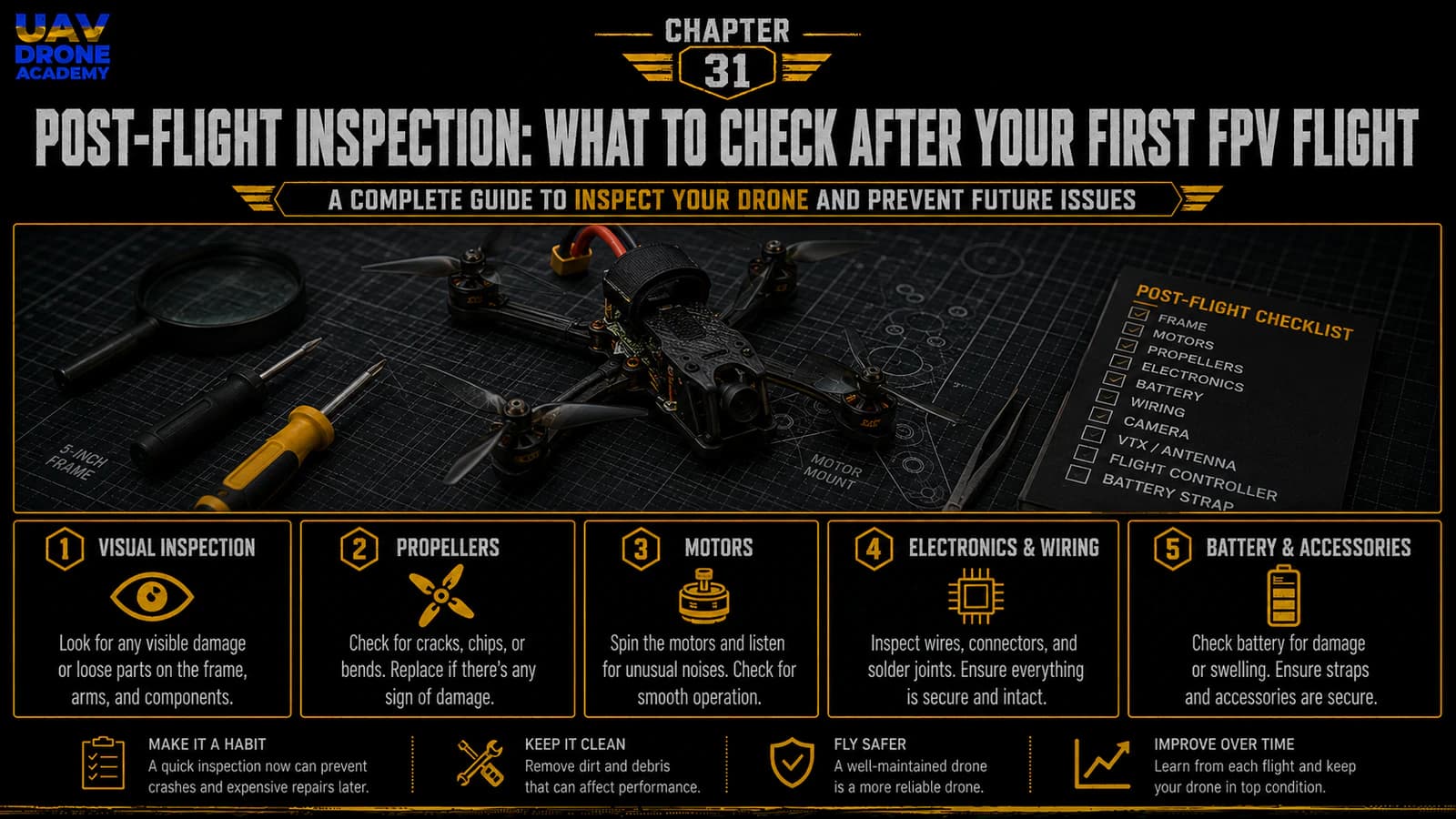
inspect the drone after the first FPV flight and identify early signs of problems before flying again.
Good pilots do not just fly.
Good pilots inspect, learn, adjust, and improve.
Why Post-Flight Inspection Matters
An FPV drone experiences a lot of stress during flight.
Even a short beginner flight can expose problems that were not obvious on the bench.
During flight, the drone is affected by:
- motor vibration
- propeller load
- battery movement
- frame flex
- wind
- landing impacts
- heat
- electrical current
- pilot corrections
A screw that seemed tight on the bench may loosen after vibration.
A wire that looked safe may move closer to a propeller.
A motor that spun smoothly without props may heat up under real load.
A battery strap that looked secure may allow the battery to shift during movement.
Post-flight inspection helps catch these issues early.
The First Rule After Landing
After landing:
disarm immediately
Then wait until all motors have stopped completely.
After that:
disconnect the battery
Do not inspect the drone while it is still powered unless there is a specific reason.
A powered drone with propellers installed must always be treated as dangerous.
The correct sequence is:
- Land.
- Disarm.
- Wait for motors to stop.
- Disconnect the LiPo battery.
- Then inspect.
Do not pick up an armed drone.
Do not walk toward spinning props.
Do not leave the battery connected longer than necessary.
Let the Drone Sit for a Moment
After disconnecting the battery, wait a few seconds before touching sensitive parts.
Some components may be warm:
- motors
- ESC
- VTX
- battery
- voltage regulator
You do not need to wait a long time, but do not rush blindly.
Use this moment to mentally review the flight:
- Did the drone feel stable?
- Did it vibrate?
- Did it drift strongly?
- Did it respond correctly?
- Did the OSD show warnings?
- Did the video break up?
- Did the battery sag heavily?
- Did anything sound strange?
Your memory of the flight is part of the inspection.
Step 1 — Check Motor Temperature
The first physical check after a flight should be motor temperature.
Carefully touch each motor.
Motors may be slightly warm.
That can be normal.
But they should not be painfully hot after a short beginner flight.
A simple beginner rule is:
warm is acceptable, very hot is a warning
Compare all four motors.
Ask:
- Are all motors similar in temperature?
- Is one motor much hotter than the others?
- Are two motors hot on the same side?
- Are all motors extremely hot?
If one motor is much hotter, stop and investigate before flying again.
What Hot Motors Can Mean
Hot motors can indicate:
- damaged propeller
- bent propeller
- loose prop nut
- bent motor shaft
- bad motor bearing
- motor screw touching windings
- excessive vibration
- poor filtering
- overly aggressive tuning
- ESC issue
- mechanical friction
Do not ignore hot motors.
If you keep flying with a problem, you may damage:
- motors
- ESC
- flight controller
- battery
- the entire drone
For a beginner build, motor temperature is one of the best early warning signs.
Step 2 — Inspect Propellers
Propellers are consumable parts.
They are designed to be replaced.
After every early flight, inspect each propeller.
Check for:
- cracks
- chips
- bent blades
- stress marks
- loose prop nuts
- grass damage
- dirt
- sand
- deformation
Even a small propeller bend can cause vibration.
Vibration can affect:
- gyro readings
- flight smoothness
- motor temperature
- video quality
- control feel
If a propeller is damaged, replace it.
Do not try to save money by flying damaged props.
Props are cheap.
Crashes are expensive.
Step 3 — Check Prop Nuts
Even if the propellers are not damaged, check the prop nuts.
Confirm:
- each nut is still tight
- propeller does not slip on the shaft
- propeller is seated correctly
- no prop hub is cracked
A loose prop can cause:
- vibration
- loss of thrust
- poor control
- sudden failure in flight
Do not overtighten to the point of damaging the prop hub, but make sure the prop is secure.
Step 4 — Inspect Motor Bells
Look closely at each motor.
Check:
- motor bell is not dented
- bell spins freely
- no dirt inside the motor
- no grass wrapped around the shaft
- no wire touching the bell
- no scraping sound
- no wobble
Spin each motor by hand.
All four should feel similar.
If one motor feels rough, gritty, or tight, inspect it before flying again.
A dirty motor can sometimes be cleaned carefully, but a damaged motor may need replacement.
Step 5 — Check Motor Screws
Motor screws can loosen after vibration or impact.
Check each motor screw.
Confirm:
- screws are present
- screws are tight
- motor does not move on the arm
- screws are not backing out
- screw length is still appropriate
If a motor becomes loose, the drone may vibrate badly or behave unpredictably.
Do not fly with loose motor screws.
Step 6 — Inspect the Frame
Now inspect the carbon frame.
Check:
- arms
- top plate
- bottom plate
- camera plates
- standoffs
- arm joints
- stack area
- battery pad area
Look for:
- cracks
- delamination
- loose screws
- shifted arms
- damaged edges
- impact marks
After a gentle first flight, the frame should look unchanged.
If the drone had a rough landing or small crash, inspect more carefully.
Carbon fiber can hide damage.
Use your fingers to feel for cracks or movement.
Step 7 — Check Frame Screws
Vibration can loosen frame screws over time.
Check:
- arm screws
- standoff screws
- top plate screws
- camera mount screws
- stack screws
Do not overtighten everything aggressively.
Just confirm that nothing is loose.
A good habit is to check frame screws regularly during early flights.
Step 8 — Inspect the Battery
The battery is one of the most important parts to inspect.
Remove the LiPo from the drone and check:
- is the battery swollen?
- is the wrap damaged?
- is the balance lead damaged?
- is the XT60 connector secure?
- are the main wires damaged?
- did the battery shift during flight?
- did the strap leave marks?
- did the battery get hit by a propeller?
- is the battery unusually hot?
A slightly warm battery can be normal.
A very hot, swollen, damaged, or punctured battery is dangerous.
Do not charge or reuse a damaged LiPo.
Step 9 — Check Battery Voltage After Flight
Check battery voltage after the flight.
Use:
- the OSD reading
- a LiPo checker
- your charger
For beginners, the important habit is learning how much battery you used.
If the battery voltage is too low after landing, the flight was too long or too aggressive.
If the battery is still high, you landed early, which is fine for first flights.
Early flights should be conservative.
It is better to land with extra battery than to over-discharge the pack.
Step 10 — Inspect Battery Strap and Pad
Check whether the battery moved during flight.
Look at:
- battery strap tension
- battery pad grip
- strap condition
- strap position
- battery lead routing
If the battery shifted, improve the mounting before flying again.
A shifting battery changes the center of gravity and can make the drone feel inconsistent.
In a crash, a loose battery can eject and damage wires or cells.
Step 11 — Inspect the XT60 Lead
The XT60 lead should not be able to reach the propellers.
After flight, check:
- wire position
- connector condition
- solder joints
- insulation
- strain relief
If the XT60 lead moved closer to the props during flight, secure it better.
A prop strike on the battery lead can cause a serious electrical short.
Step 12 — Inspect Motor Wires
Look along each arm.
Check that motor wires:
- are still secured
- did not move into prop path
- are not cut
- are not rubbing on carbon
- are not touching motor bells
- are not damaged by landing or crash
If any wire insulation is damaged, repair it before flying again.
Do not fly exposed motor wires.
Step 13 — Inspect the ESC and Flight Controller Stack
Look inside the center of the drone.
Check:
- ESC still mounted securely
- flight controller still mounted securely
- stack screws are tight
- soft mounts are intact
- ESC-to-FC harness is seated
- no wires are pinched
- no components smell burnt
- no debris is inside the stack
A stack problem can become serious quickly.
If you smell burnt electronics, stop immediately and inspect carefully.
Step 14 — Check the VTX
The VTX can get hot during bench testing and flight.
After the flight, check:
- VTX is still mounted
- antenna connector is secure
- antenna is not damaged
- wires are still connected
- VTX did not shift
- no overheating signs are visible
If video was noisy or unstable during flight, inspect the VTX and antenna carefully.
Step 15 — Check the FPV Antenna
Inspect the antenna.
Check:
- antenna is not loose
- antenna stem is not cracked
- antenna connector is tight
- antenna is not bent into props
- antenna is not blocked by carbon
- antenna did not rotate into a bad position
A damaged or loose antenna can reduce video range and quality.
Do not fly with a questionable antenna if you noticed video problems.
Step 16 — Check the FPV Camera
Inspect the camera.
Check:
- camera angle did not move
- lens is clean
- lens is not cracked
- camera screws are secure
- camera wires are not pinched
- image was stable during flight
If the camera angle changed during the flight, tighten the side screws carefully.
For beginner flights, a moderate camera angle is still recommended.
Step 17 — Check the Receiver and Antenna
Inspect the ExpressLRS receiver and antenna.
Check:
- receiver is still mounted
- antenna is still in position
- antenna is not damaged
- antenna is not touching carbon fiber
- wires are not loose
- link quality was normal during flight
If the OSD showed radio link warnings, do not ignore them.
Investigate before flying again.
Step 18 — Review OSD Information
Think about what the OSD showed during the flight.
Important things to review:
- battery voltage
- average cell voltage
- warnings
- flight mode
- link quality
- timer
- RSSI dBm or signal indicator
- any arming or failsafe warning
If you recorded DVR, review it.
DVR can reveal things you missed during the flight.
For beginners, DVR is not only for sharing footage.
It is a learning and troubleshooting tool.
Step 19 — Review Flight Behavior
Ask yourself:
- Did the drone drift too much?
- Did it feel unstable?
- Did it oscillate?
- Did it bounce after stick inputs?
- Did it vibrate?
- Did it respond correctly to roll?
- Did it respond correctly to pitch?
- Did yaw feel normal?
- Did throttle feel manageable?
- Did it feel too sensitive?
Some small issues may be normal for a beginner.
But strong vibration, severe drift, or strange control response should be investigated.
Do not immediately blame PID.
First inspect mechanical and configuration basics.
Step 20 — Check for Loose Hardware
After the first flight, check all visible hardware.
This includes:
- motor screws
- arm screws
- stack screws
- camera screws
- top plate screws
- antenna mount hardware
- battery strap hardware if used
Use the correct tool size.
Do not strip screws.
If a screw repeatedly loosens, consider whether threadlocker is appropriate.
Use threadlocker carefully and only on metal-to-metal screws, never where it can contact plastic or electronics.
Step 21 — Clean the Drone
If the drone landed in grass, dirt, or dust, clean it.
Remove:
- grass from motors
- dirt from frame
- dust from camera lens
- debris from stack area
- mud from battery pad
Do not use excessive liquid.
Electronics and moisture do not mix.
A small brush or compressed air can help, but be gentle around electronics.
Step 22 — Decide If the Drone Is Ready for Another Flight
After inspection, make a decision.
The drone is ready for another flight only if:
- motors are not too hot
- props are undamaged
- battery is safe
- frame is secure
- wires are safe
- antennas are secure
- OSD showed no serious warnings
- flight behavior was normal
If something is wrong, stop and fix it.
Do not continue flying just because you are excited.
Excitement causes expensive mistakes.
Step 23 — Record What You Learned
A simple flight log is very useful.
Write down:
- date
- location
- battery used
- flight time
- landing voltage
- weather
- flight mode
- problems noticed
- repairs needed
- settings changed
- lessons learned
This habit helps you become a better pilot and builder.
You will start to see patterns.
For example:
- one motor always runs hotter
- one battery sags more
- one prop type vibrates less
- one screw always loosens
- one antenna position gives better video
This is how experience builds.
What Is Normal After a First Flight?
After a short beginner flight, it can be normal to see:
- slightly warm motors
- slightly warm battery
- small amount of dust
- minor nervous flight behavior
- short flight time
- cautious landing
- small prop marks from grass
That is okay.
The first flights are not supposed to be perfect.
What Is Not Normal?
Stop and investigate if you find:
- very hot motors
- burnt smell
- damaged battery
- swollen LiPo
- loose motor
- cracked frame arm
- cut wires
- loose antenna
- missing screws
- damaged propellers
- severe vibration
- repeated RX warnings
- video loss
- uncontrolled drift
- strange motor noise
These are not things to ignore.
Fix problems early.
Common Beginner Mistakes
Flying Again Without Inspecting
After a successful first flight, beginners often want to immediately fly again.
Inspect first.
Ignoring Hot Motors
Hot motors are a warning sign.
Find the cause before continuing.
Reusing Damaged Props
Damaged props create vibration and can cause bigger problems.
Replace them.
Ignoring Battery Condition
LiPo batteries must be treated seriously.
Do not use damaged packs.
Not Reviewing OSD Warnings
If the OSD showed a warning, understand it.
Warnings exist for a reason.
Blaming PID Too Quickly
Many problems are mechanical, not tuning-related.
Check hardware first.
Forgetting to Secure Wires After Landing
A wire that moved during flight may be cut by a propeller on the next flight.
Inspect wire routing every time.
Beginner Post-Flight Checklist
After every early flight, check:
Safety
- drone disarmed
- battery disconnected
- motors stopped
- drone safe to approach
Motors
- temperature checked
- bells spin freely
- no dirt or grass
- screws tight
- no abnormal sound
Propellers
- no cracks
- no bends
- no chips
- nuts tight
- props seated correctly
Frame
- arms secure
- no cracks
- screws tight
- stack secure
- camera secure
Battery
- no swelling
- no damage
- voltage checked
- not too hot
- strap held correctly
Wiring
- motor wires secure
- XT60 lead safe
- no exposed copper
- no wires near props
FPV System
- VTX secure
- antenna secure
- camera clean
- video was stable
Receiver
- antenna secure
- link quality acceptable
- no serious RX warnings
Flight Review
- no strange vibration
- no severe drift
- no unexpected warnings
- no abnormal sounds
If everything passes, the drone may be ready for another short controlled flight.
What We Have Completed
At this stage, we have completed the first full flight cycle:
- Build.
- Configure.
- Pre-flight check.
- Hover test.
- First controlled flight.
- Post-flight inspection.
This completes Part 5 of the series:
First Flight
The drone has now moved from a project on the bench to a tested FPV aircraft.
But the learning process is not over.
In fact, this is where long-term FPV ownership begins.
Our Build Philosophy Moving Forward
The next stage is about keeping the drone reliable.
FPV drones crash.
Parts wear out.
Props break.
Motors get dirty.
Screws loosen.
Batteries age.
Antennas get damaged.
That is normal.
A good FPV pilot learns how to maintain, repair, and improve the drone over time.
The first build is not the end.
It is the beginning of your learning platform.
Conclusion
Post-flight inspection is one of the most important habits for beginner FPV pilots.
After the first flight, you should carefully check:
- motors
- propellers
- battery
- frame
- wiring
- FPV system
- receiver antenna
- OSD information
- overall flight behavior
This inspection helps catch small problems before they become serious failures.
A safe FPV pilot does not just fly until something breaks.
A safe FPV pilot observes, inspects, learns, and improves after every flight.
Now that the first flight phase is complete, we are ready to move into the final part of the series:
evolution, maintenance, and upgrades
In the next chapter, we will learn how to maintain your FPV drone and keep the build reliable over time.
Next Chapter
FPV Drone Maintenance Guide: How to Keep Your Build Reliable